ZOBRELLA · CANVA APP
Motion Trail
One picture.
More momentum.
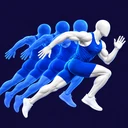
Add an Echo effect to a runner, give a logo a sense of speed, or create a trail behind your own picture.
Choose a style, make it your own and bring the result into your Canva design.

START WITH ECHO
Repeat the picture.
Build the effect.
A simple repetition can change the whole feeling of an image.

Your colours.
Your direction.
Use a colour preset, keep the picture’s colours or choose a custom colour. Change the direction and length to put the effect where you want it.
- Four styles: Trail, Ribbon, Echo and Speed
- Direction, colour, length and glow controls
- A 4K still image for your Canva design
FROM PICTURE TO PAGE
Make your first
motion effect.
- 01
Choose a picture
Try Sprinter or the ZOOM logo, upload your own picture, or use one image selected in your Canva design.
- 02
Find your motion
Start with Echo or choose Trail, Ribbon or Speed. Adjust the colour, direction, length and glow.
- 03
Add it to your design
Choose Add to design to place the finished still image on your Canva page, with a 4K output.
Output quality depends on your source image. All styles create still images.
A FEW QUICK ANSWERS
Before you start.
What does Motion Trail create?
Motion Trail adds a motion effect behind a picture or logo and combines the result into one still image. It does not create a video or animated effect.
Which effect styles can I choose?
There are four styles: Trail, Ribbon, Echo and Speed. The app opens with Echo selected. Change the colour, direction, length and glow, and use Dust or Sparkle when you want those extras.
What does 4K mean here?
The output has 3840 pixels on its longest edge and is added as a still image. Sharpness also depends on the original picture: increasing the output dimensions cannot restore detail missing from a small or blurry source.
Is Motion Trail available in Canva yet?
Motion Trail is coming soon. This page introduces the app while it is being prepared for release. A public Canva listing link will be added here when it is available.
KEEP CREATING